Search This Blog

Showing posts with label list. Show all posts

Monday, July 23, 2012

Reading in CODE

I have mentioned before things that will make you a better coder and this is just another tip on what you can do to improve your coding abilities.

There are many websites out there that have some really advanced coding, stuff that can make you feel like you have no idea what you are getting yourself into (trust me I know the feeling) and half the time when you view the source for the site you get lost and end up convincing yourself that you suck.

Recently I have noticed that coding and performing things that is unusual is actually not that hard. Reading the source code can be difficult sometimes but there is a reason why it is difficult and here are some of those possible reasons.

  1. You don't know the language they are using
  2. It looks so cluttered it frightens you away
  3. There are multiple sources
  4. Finally, there are hundreds of classes, ID's, NAMES, Tags, functions, variables, etc.
I'm going to take you step by step and hopefully help you guys out so you can read these source codes and learn a bit more about coding.

1. You don't know the language they are using
This one is simple but not easy or fun but if you really want to understand what they are doing with this mysterious language you must first learn what the language is by just Google searching one of the tag names or something you see commonly used in the source. 
Second you must become familiar with the Syntax in order to understand anything that is going on. This one may be the hardest only because it's a whole new language that you have to master in order to perform something you like on the website
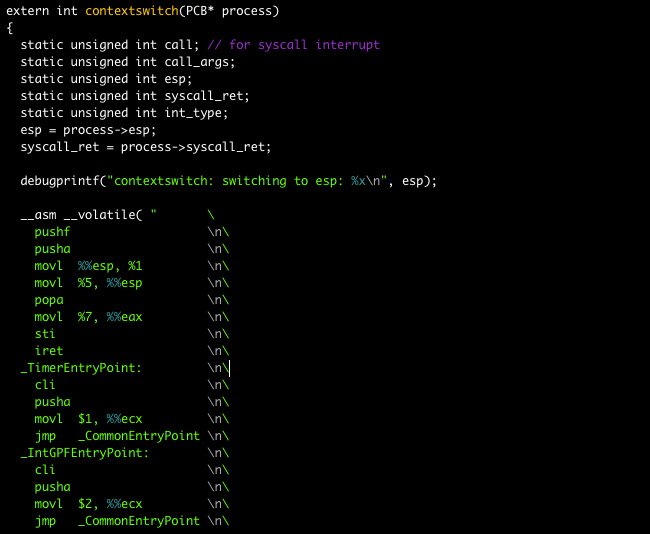

2. It looks so cluttered it frightens you away.
When I first saw Javascript it looked like this 

Which nearly scared me away thinking "How the hell am I going to ever be able to understand this!?" Well the truth is that I really had to concentrate on the code itself and not the code as a whole. It would take hours to understand but if you go through it you can see little things that link together and it makes complete sense after a while. You still need to know the Syntax first!

What you can do to make it easier for you is to copy the code into a text pad like Notepad++ , set the language to Javascript (or whatever language you are having trouble with) and it will highlight and color the text differently which will make it easier to see what connects with what.

3. There are multiple sources.
Honestly I hate going through sources and seeing there are 20 different Javascript files, and 10 different Style Sheets, not to mention the 4 ASP and PHP files! It can really drive a guy mad... Now I'm not saying it's not useful when making a website just a pain in the butt when reading the source. 

The best way to get through it is to copy the codes into Notepad++ and connect the files together yourself, this way you see which files are being used where and why. I know it will take forever but no one said programming and developing was easy. Another thing you can do is open all the sources and read them, when you see something called from another source just read where it's calling from and what it's supposed to be doing. This has got to be the most tedious thing about learning new things in programming.

4.Finally, there are hundreds of classes, ID's, NAMES, Tags, functions, variables, etc.
Even though it's not always necessary people prefer to have a class just for the height of a div to be 200px and another class for it's width, another for it's position, and so on.

This really sucks for the reader because you have to go back and read what each class is doing for each element, however, although this is very difficult to read I do find it easier to code through classes rather than through individual ID's and when using Variables it's easier to have a variable for every aspect of the element or function than to rewrite everything. 
Again, using Notepad++ to read each class, element, tag, variable, function, etc. 

---------------------------------------------------------------------------------------
Open Source is the not only the best way to go but the only way! I know there are a lot of people out there that want to steal the code and gain profit from it for themselves but that's why you use different sources for one code, you have multiple classes, variable, tags, etc, and that's why make the entire thing cluttered which makes it hard for those thieves to steal the code. This makes it hard to everyone but is still considered open source. 

Thanks for all the love guys don't forget to subscribe, check out the Youtube, Facebook, and Twitter @DLCSpencer

Love you guys check back soon for more updates and videos!

Monday, July 16, 2012

Best Coding Languages to Know

Languages both for programming and for web development are all necessary and are at the same time awesome. But which ones are the ones you should learn first? What order should you learn them to effectively become an awesome developer? Well here we go this list will help everyone know which language to learn when.


1. HTML (Hyper Text Markup Language)
This is the very first language you should learn in order to build websites and it the most common and most demanded. If you go into an interview for building websites but you don't know HTML you will never get the job. With the creation of HTML5 we are seeing things like Canvas which can be used to draw images using code.


2. CSS (Cascading Style Sheet)
This is the best way to style your websites to give the specific flare required to make a website look awesome and keep your viewers interested. It can also add hover effects and is now able to create animations with CSS3 this will make any website look much more professional.


3. PHP (Hypertext Preprocessor)
Originally made for building websites but can be used for gathering info from the user, generating dynamic content, and sending/receiving cookies. (I personally am learning this still but haven't needed it enough to get the entire language memorized.) This will be useful for everyone who wants to have a user based website or wants to have form information received and stored into the server


4. Javascript
An amazing language that is used for dynamic content. I suggest learning this language before any programming language because it's a nice introduction to the programming side of coding. Containing variables, functions, if/else statements, while statements, and more, Javascript makes nearly anything possible with web development. 


5. Java
After learning Javascript you learn quickly the syntax needed to create Java programs. Java and Javascript are two different languages but have similar syntax which means you will learn quickly. Java is a powerful programming language that could be used for created nearly any type of program and is one of the most requested languages for programmers, why? because it can be used on nearly every single device so long as it jas Java downloaded onto it.


6. C++
This is another programming language that is used solely on it's own. This language can do anything you need it to so long as you understand the syntax. One of the most powerful languages you will ever learn. It is an update to C which is also very powerful. Learning both is smart but C++ is much more commonly used not to mention it's very fast.


7. Actionscript (used in Adobe Flash)
I know that most people learn this language earlier on and the only reason I'm putting it last is because you have to pay for it and it is much less practical to the common programmer just starting out without the ability to pay for a powerful program such as flash.
However with that aside this language is very powerful and can create some of the coolest effects you will see in coding because it is rooted into Flash.


Thanks for reading guys be sure to check back every week for new blogs and videos if you have anything you think I should go over feel free to post it in the comments.

Monday, July 9, 2012

Creating Logos the Right Way

Logos are what makes your business what it is. There are some rules you must follow if you want to make your logo very recognizable and good looking.


1. You should be able to recognize your logo even when you can't see all of it.


You can see right away just by looking at the image below what logo it is. Your logo must be as recognizable to you as this one is without even being able to see all of it.
The Google logo cropped in
2. Your logo must be clear in both color and B&W


When your logo has too many layers over each other it becomes hard to recognize once it is black and white.


In the example above you see there are two colors on top of each other but they don't blend together terribly. You can see the difference when you make it black and white so always make sure you have 3 images for your logo: Full Color, Greyscale, and B&W

3. Always have a copy of your logo saved as a PDF

PDF's are good for distributing your logo because they keep the size and shape of the image without having to read a full vector file. PDF's are much better at displaying the image on devices used for presentations.

4. You must know the different effects a logo gives between a complex design and a simple design

When you design your logo or a clients logo you must always understand whether to make a complex or a simple logo. 

Complex logos are more detailed and can catch someones eye and attention.

Complex logo


Simple Logos are easier to remember and can be recognized much faster than complex designs.

Simple logo


Each style has it's perks so you must decide if you want to the logo to capture attention and make people want to see your business OR have your logo recognizable and easy to remember for your viewers. 

Neither one is necessarily better than the other, it just depends on how you feel you want your logo to be seen.

5. Avoid being common

Some of the most common fonts used in logos are Helvetica, Papyrus, Comic Sans, and Times New Roman. If you do use these fonts try to do a little modification to them to make the logo look unique.

Logos with similar design.


Remember that your logo must be unique, if you are comparing your logo to someone else's then you are going about this wrong. Start from scratch, pull out some paper and make about twenty sketches, choose which one you like most, then sketch ten different ways you can make that same logo, choose your favorite and run with it. To those graphic designers out there who want to focus on logos, I suggest doing this at least two times a week just to get used to sketching a lot.

6. Register Your Logo!

Always be sure that you register your logo and tell your clients to register the logo otherwise it is up for grabs and you will have to start over. This is also the best way to be seen as professional to your clients and their clients. 

Registered Trademark

Your logo is unique, don't allow other people to take that away by making similar logos, trademarking your logo prevents that from happening and protects your logo from thieves trying to steal your audience. 


All Logos shown in this post are copyright to the owners. Design Loves Coding does not take any credit for these logos, nor are we affiliated in any way.

Monday, June 18, 2012

4 Things that will make you a better Coder

Coding is difficult of you are just starting out so here are some steps that can help you become a better developer.


#1 Study
Coding has a lot to do with math and algorithms and has many different tags and terms for you to remember. Take some time out of your day to just practice recognizing those different tags or functions, try taking a course on or offline because with web development there are just some things you cannot learn from YouTube or Google.


#2 Practice
I suggest getting a program such as Notepad++ (which is what I use) to constantly  be coding something new. Even if it's small just think of what you want to do, regardless if you know how to do it or not, and try to do it. If there is something you cannot figure out first search Google to see if there is the answer anywhere there, if not, try Yahoo Answers because they are very helpful and I sometimes answer questions in there.


#3 Be Inspired
I will soon be posting up some inspirational websites that you should all take a look at, for you coders out there if you really want to become a good developer you should view the source of the website and just look at how complicated it can be, HOWEVER there is nothing in there that you can't do it just takes a lot of practice and training.


#4 DLC
Keep coming back to Design Loves Coding because we will always be doing new things and posting new videos and blogs so you can learn more and become inspired


Remember that you have to keep your mind open to the idea that you could be the next person to code something everyone will want a piece of.

Friday, June 15, 2012

8 things to make you a better designer

There are many things that help make someone a better designer but here are a few to get you on the way to success in design.

#1. Adobe Suite
Yes I know it's pretty obvious that Adobe would make the list but it's for good reason. With programs like Photoshop, Illustrator, inDesign, Flash, and Dream Weaver  you can't go wrong.
These programs all have certain things that make them important to us designers. 
If you don't have the money for a program like this to help you out I know something that anyone can afford because its FREE

#2. Pain.NET
This is the program that got me started in designing and made me see the world of design through a different view. Paint.NET is a drawing program that you can use to both create images or edit images. The best part about Paint.NET is that you can download plug-ins for free that other users made. So unlike Adobe when you want an update you don't have to pay it's all free and since the users can create their own plug-ins it is virtually limitless what Paint.NET can do.

#3 Inspiration
There is more than just products and software out there that will help you become a better designer, there is inspiration. Now days you can click a link and see a beautiful website that just makes you want to design and with this much access to inspiration there is no reason why you shouldn't surround yourself with it. 


#4 Wacom Drawing Tablets
Wacom has not failed with me yet and I am very happy with my tablet. With this you can do so much with photoshop and illustrator that makes things so much better and is much easier to draw with because we are used to drawing with pencils. I use this to sketch out my designs and and with it's pressure sensitive pen you can really get creative with it.


#5 Drawing Constantly
Draw constantly either with the tablet or the pencil and paper. There is so much to learn from drawing. Practice doing realistic drawings and cartoon drawings to keep your mind open to new ideas. You can practice this everyday if you like but really just practice whenever you want it can make you a much better designer.


#6 Looking at Magazines
Yes design is not just about the image or graphic but also about the layout of a page and magazines such as Vogue really portray this idea perfectly. Don't go out and buy a magazine focused on gossip but look for a magazine that wants to represent beauty because you can really see amazing layout design within them.


#7 Watch and read tutorials
There is no limit of what you can do with design and tutorials really do help open up minds and teach you how to do things you probably didn't know was possible. 
Sometimes however there are things you just can't learn through tutorials and you have to take a class in the subject.


#8 Keep up with DLC!
We are constantly updating tutorials and videos and will always bring you awesome new things dedicated to Design AND Coding.


Be sure to always check back here for new tips ideas make sure you like us on Facebook and subscribe to us on Youtube.